


Perfect Tuner
4.21.28K Reviews
App Specs
- Version
- 2.0.37
- Updated On
- License
- Free
- Downloads
- 10,000,000+
- Developer
- Beat Blend Labs
- Categories
- Music & Audio
- Platform
- Android, iOS
Screenshots


 Analysis by AppCompare
When I’m getting ready to play, I want to spend my time making music, not hunting through menus. A phone tuner is useful when it turns a string’s sound into a clear next step, and that simple job is where Perfect Tuner makes its case. It listens through the device microphone and presents pitch visually, which is a practical approach for a quick check at home, in a practice room, or before a casual session.
A clear way to read pitch
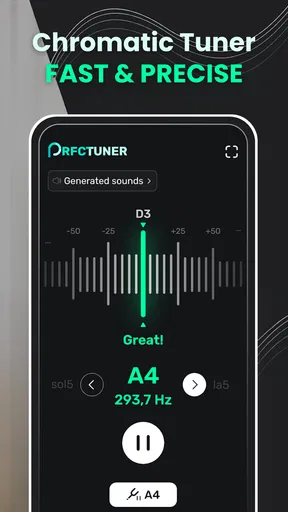
The main value here is not a long list of extras; it is the visual feedback. Seeing whether a note sits flat or sharp gives a beginner a more helpful cue than relying on pitch by ear alone. I would pluck one string, let its sound settle, and make small adjustments while watching the indicator rather than turning the peg in a rush. That measured rhythm is especially useful on a guitar, where a large turn can overshoot the target and leave you chasing the note back and forth.
That workflow also makes the app useful as a learning aid. It does not replace training your ear, but I can use it to check whether my adjustment moved the pitch in the right direction, then listen again before moving on. Once the instrument is close, tuning each string in sequence is less frustrating than trying to fix everything at once. The screen’s flat-and-sharp indication helps turn an abstract sound into a manageable decision.
First Impressions
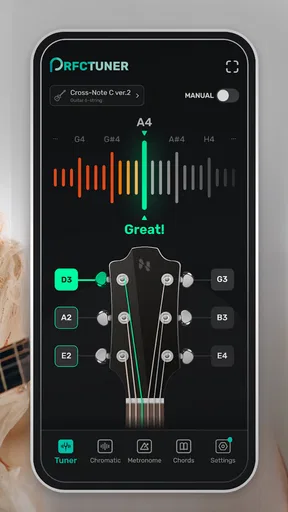
So, I downloaded Perfect Tuner after hearing a lot of buzz about it from my fellow musician buddies. Right off the bat, the app's interface is as clean as a whistle. It’s got this minimalistic vibe that doesn’t overwhelm you with a bunch of technical jargon. You open it up, and bam, you’re greeted with a straightforward tuner screen. No frills, just function.
Features That Hit the Right Notes
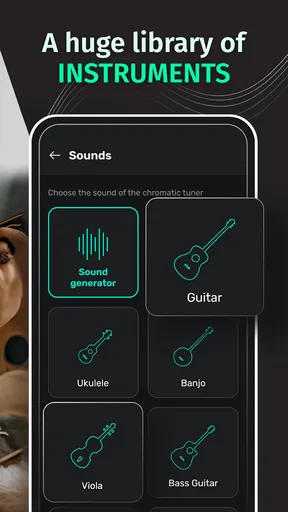
One of the coolest things about this app is its versatility. It’s not just limited to guitars; it can tune pretty much anything with strings. We’re talking ukuleles, violins, bass guitars, and even banjos. The app uses your device’s microphone to detect the pitch, and it’s surprisingly accurate. I tested it out with my acoustic guitar and my trusty ukulele, and both times, the tuning was spot on.
For people who switch instruments during the week, that flexibility is more than a novelty. I can picture keeping it ready for a guitar before rehearsal and a ukulele when someone brings one along to a get-together. A dedicated clip-on tuner may be easier to keep attached to a single instrument, but a phone app is convenient when I need to check different stringed instruments without carrying several devices. That convenience does depend on having the phone nearby and a quiet enough moment to hear the note clearly.
Choosing a tuning for the song
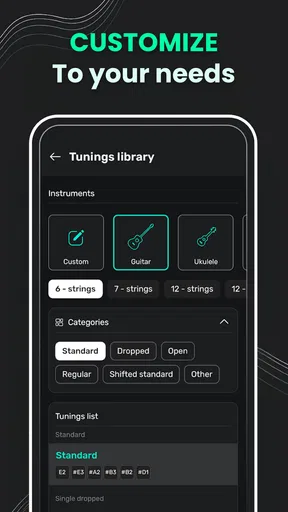
Another neat feature is the variety of tuning modes. Whether you’re into standard tuning or you like experimenting with drop D or open G, Perfect Tuner has got you covered. This is perfect for those of us who like to switch things up depending on the song or mood.
Worth Reading Before You Choose

EA SPORTS FC Mobile 26 Is a Bigger Football Game, but It Takes Time

Flipboard Shows What News Apps Must Do Beyond the Feed

Switching to Android Auto Means Rethinking Your Driving Routine

Google Calendar Makes a Crowded Week Easier to Manage

Ludo King Makes the Most of the Minutes Between Plans

Baby Panda World Brings Quick Play to Modern Phones, but Its Game Library Feels Busy
One sensible habit when changing tunings is to decide on the song’s setup before you start playing, then tune every string deliberately rather than making a last-second partial change. That helps avoid beginning a song with one string still in its old position. If you regularly return to an alternate tuning, checking the mode before you touch the pegs can also prevent a confusing mismatch between what you hear and what the display expects. The app gives a convenient way to make those changes, though it is not a substitute for knowing which tuning a particular arrangement calls for.
Getting into the Nitty-Gritty
So, let’s talk about usability. I found the app to be incredibly user-friendly. The instructions are intuitive, and even if you’re not tech-savvy, you’ll find yourself navigating through it like a pro. Each string is represented visually, and you can see when you’re flat or sharp by the color and position of the needle, which makes tuning a breeze.
Because the tuner listens through a phone microphone, the setting around you matters. In a noisy room, another instrument or nearby conversation can make it harder to isolate the note you mean to tune. I’d pluck one string at a time, mute the others, and hold the phone close enough to hear the instrument without letting its sound get lost in the room. This is a useful small routine for a shared practice space, but it also explains why a clip-on tuner can be the better choice on a loud stage: it senses vibration at the instrument rather than relying on the surrounding sound.
Keeping track between sessions
One little feature that might seem trivial but is actually super handy is the history log. Ever tuned your instrument to a specific setting and forgot what it was? Well, this app keeps track of your last few tunings, which saves you from the headache of trying to remember.
That history is most useful when a player moves between familiar setups, not as a replacement for writing down a complex arrangement. If I tune for a practice, put the instrument away, and later want to return to the same recent setup, a record can save a bit of guesswork. For a band rehearsal, I would still confirm the intended tuning with the other players rather than assume the last one in the log is right for the next song. It is a small convenience, but it supports a more consistent routine.
Where a phone tuner fits best
For a realistic everyday example, imagine arriving home with a guitar that has been moved around and needs a quick check before a short practice. I can open the app, tune in a quiet corner, and spend the rest of the evening working on a song instead of searching for a separate tuner. The same approach works for a beginner who wants a visual guide while learning how each peg affects pitch. It is less ideal when the room is busy, the instrument is hard to hear through the phone, or there is no time to make careful adjustments.
Compared with tuning by ear, the app offers a visible reference that can reduce uncertainty, especially for newer players. Compared with a physical tuner, it avoids carrying another item but asks you to use the phone microphone and screen. Those are different tradeoffs rather than a universal winner: I would reach for the app for home practice and instrument changes, while a player performing in a loud environment may prefer a clip-on unit. Someone who wants to tune by ear alone may also find a screen distracting once their pitch skills are established.
Who gets the most from it
I would recommend this kind of tuner most to beginners, casual players, and musicians who rotate among several stringed instruments and want a straightforward check without extra gear. It can also suit someone who experiments with familiar alternate tunings and appreciates having recent setups in one place. Players who depend on a tuner under noisy live conditions, or who want a dedicated physical control that stays on an instrument, may be happier with hardware instead. For serious practice, I would use it as a reliable reference point while still listening closely to the instrument and learning how it responds.
Cost, compatibility, and expectations
Perfect Tuner is a free music and audio app from Beat Blend Labs, with optional in-app purchases listed from $0.99 to $99.99 per item. Its broad reach is reflected in an average rating of 4.4 from around 75,000 ratings, and it has passed 10 million installs. Those figures suggest that phone-based tuning has a wide audience, but they do not change the practical point: the best result still depends on hearing one clean note at a time and making controlled adjustments.
The app is rated Everyone, was released on May 30, 2014, and its current version is 2.0.37. It requires Android 6.0 or later. That makes it a reasonable option for many Android users with a compatible device, while anyone on an older system should check compatibility before planning to rely on it. The basic appeal is the quick, visual tuning workflow; the optional purchases are worth considering only if their offerings match what you actually need.
My routine for a cleaner check
To get the most from a microphone-based tuner, I would start with a quiet pause, pluck a single string, and let the note ring instead of repeatedly striking it. I would mute neighboring strings if they continue to vibrate, make a small peg adjustment, and pluck again to see whether the pitch moved the intended way. This is not a special trick so much as a way to avoid misreading noise or reacting to a note that has not settled. It also makes the process less hurried, which matters when tuning unfamiliar instruments.
If the display seems unsettled, I would first change the conditions rather than immediately blame the instrument: stop nearby playing, reduce room noise where possible, and try a clearer single note. If the problem remains in a loud environment, a clip-on tuner is a sensible alternative. If the issue is that I am unsure which tuning a song needs, I would confirm that separately before adjusting strings. A tuner can show pitch, but it cannot decide the musical arrangement for me.
My verdict
For a free app, Perfect Tuner offers a lot. There are no annoying ads popping up every few seconds to ruin your flow, which is a huge plus for me. The app runs smoothly without any lag, even when I switched between different tuning modes multiple times.
I also appreciate the fact that it doesn’t require an internet connection. So, if you’re jamming out in the middle of nowhere, you can still make sure you sound pitch-perfect.
All in all, Perfect Tuner is a solid choice for musicians of all levels. It’s simple, effective, and won’t cost you a dime. Whether you’re a seasoned pro or just starting out, this app can definitely help keep your instruments sounding their best.
So, if you’re on the hunt for a reliable tuner app, give Perfect Tuner a whirl. It might just become your go-to tuning tool. Happy strumming!
Pros
- Easy-to-use interface for beginners.
- Accurate pitch detection for tuning.
- Supports a wide range of instruments.
- Customizable tuning settings available.
- Lightweight app with fast performance.
Cons
- Limited advanced features for pros.
- Ads can be slightly intrusive.
- No offline mode available.
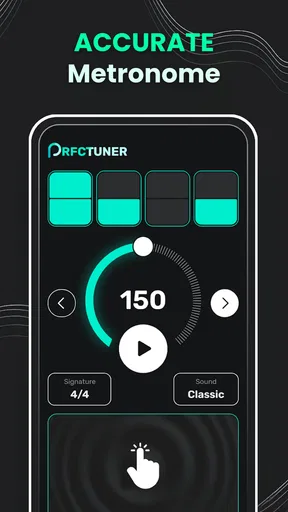
- Lacks built-in metronome feature.
- User interface feels a bit outdated.
FAQs for Perfect Tuner
What platforms is Perfect Tuner available on?
Perfect Tuner is available for both Android and iOS platforms. Users can download the app from the Google Play Store for Android devices and the Apple App Store for iOS devices. Ensure your device meets the app's minimum system requirements for optimal performance.
Does Perfect Tuner support multiple musical instruments?
Yes, Perfect Tuner supports a wide range of musical instruments. Whether you're tuning a guitar, violin, ukulele, or piano, the app offers specific tuning modes tailored for each instrument, providing accurate and reliable tuning options for musicians of all levels.
Is there a cost associated with using Perfect Tuner?
Perfect Tuner offers both a free version and a premium version. The free version includes basic tuning features, while the premium version unlocks advanced tuning modes, additional instruments, and ad-free experience. Users can choose the version that best fits their needs and budget.
How accurate is Perfect Tuner compared to physical tuners?
Perfect Tuner is designed to offer high accuracy comparable to physical tuners. Its sophisticated algorithm detects pitch with precision, making it a reliable tool for both amateur and professional musicians. However, external noise can affect its accuracy, so using it in a quiet environment is recommended.
Can I use Perfect Tuner offline?
Yes, Perfect Tuner can be used offline. Once downloaded, the app does not require an internet connection to function, allowing you to tune your instrument anywhere, anytime. This feature is particularly useful for musicians who frequently travel or perform in remote locations.


